
Subscription
Purpose
Dokman is free for everyday use. Pro unlocks the power features: more workspaces, the container terminal, alert rules with mutes and quiet hours, and log sharing. Everything is managed under Settings → Subscription (also reachable from the workspace card). Plans are per server: each Dokploy you want Pro on needs its own subscription.
User Flow
Read your status
Step 1: Open Subscription
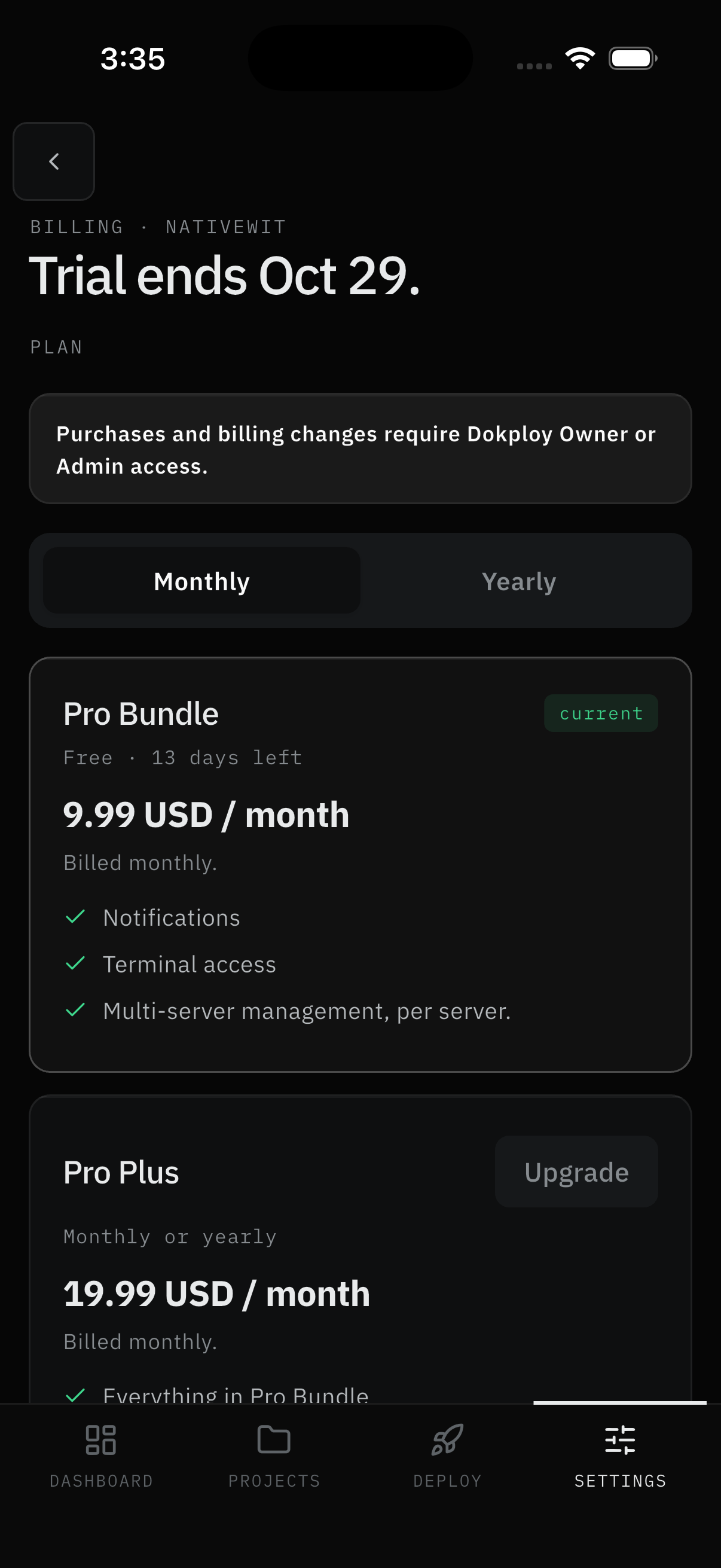
- Open Settings → Subscription. The headline states where you stand, with a notice that purchases and billing changes require Dokploy Owner or Admin access.
- Below it, a Monthly / Yearly toggle prices each plan card. Your plan carries a current badge with its state.
Result:
- You know exactly where you stand before spending anything.
Subscribe
Step 2: Check out
- Pick Monthly or Yearly and tap Subscribe. The confirmation states the price, the cycle, and that a temporary $1 hold verifies your card (released automatically) - no real charge until any trial ends.
- A secure payment page opens in your browser. Pay there.
- The app detects the completed payment when you return, and Pro features unlock. It also re-checks on its own whenever it comes back to the foreground.
Result:
- Pro activates on this workspace.
Note:
- Leaving checkout halfway leaves the order pending. Come back to Subscription and tap Resume to continue where you left off instead of paying twice.
- New workspaces start on a trial with full Pro access and a headline counting down to its end. Subscribe before it lapses to keep Pro uninterrupted; afterwards the workspace falls back to Free and Pro controls disappear until you subscribe.
Manage the plan
Step 3: Change, cancel, or resume
- Upgrade takes effect immediately. The exact prorated amount shows before you pay and the current period is unchanged; on trial, nothing is charged until the trial ends.
- Downgrade takes effect next cycle - you keep the current plan until then, with no charge today.
- Reactivate restores a cancelled plan.
- Cancel normally stops auto-renewal while Pro stays active until the end of the current period. Cancelling during a grace trial instead ends the subscription immediately, and that can't be undone - the confirmation says which one applies.
- Order history lists invoices, including pending orders you can Resume.
Result:
- The plan matches what you need, with every money-moving step confirmed up front.
Roles
- Billing managers (workspace owner plus Dokploy admin) - pay, change, cancel, and see order history.
- Everyone else - status card only.
Screens Involved
- Subscription (status card, plans with Monthly/Yearly toggle, manage actions, order history)
- External secure payment page (browser)
- Confirm sheets (Subscribe, Upgrade, Downgrade, Cancel, Reactivate)
Inputs
User Inputs:
- Billing cycle selection (Monthly / Yearly)
- Subscribe / Upgrade / Downgrade / Cancel / Reactivate / Resume confirms
- Payment details (on the external pay page only - never in Dokman)
Outputs
- Active Pro subscription on this workspace (or scheduled change / cancellation)
- Order history entries and invoices
Free vs Pro
| Free | Pro | |
|---|---|---|
| Projects, apps, databases, deploys, logs | ✅ | ✅ |
| Push alerts + history | Trial only | ✅ |
| Workspaces | Plan cap (generous) | Raised plan cap |
| Container terminal | Upgrade prompt | ✅ (containers per your Dokploy access) |
| Trigger backups | Hidden | ✅ (admin only) |
| Email notifications | Hidden | ✅ |
| Alert rules, mutes, quiet hours | Hidden | ✅ |
| Log copy / share / export | Hidden | ✅ |
Error Handling and Edge Cases
| Scenario | System Behavior |
|---|---|
| Checkout abandoned | Order stays pending - Resume instead of paying twice |
| Payment completed but Pro missing | Return to the app or foreground it - status re-checks automatically |
| Manage actions missing | Not a billing manager - status card only |
| Grace-trial cancel | Ends immediately and can't be undone - confirmation warns first |